Customising cmux with lambda microvms for isolated sessions
MicroVMs are pretty neat
AWS shipped Lambda MicroVMs this month. Many others have explained it better than me, especially Aidan Steele’s post. He also wrote a ssh container that allows you ssh into a microvm. It got me thinking about a few use cases that overlap with my own dev flows. Since each session can last for 8 hours, we can easily run a harness or spec before we log off and then close our laptops. We can also spin up machines with only the tools we need to audit and do forensics. There’s already an AWS sample showing the agent-runtime angle (Anthropic webhook > spawn microVM > run a managed agent’s tool calls). What I really wanted was to hook this into cmux and just spin up remote sessions without thinking about it. But first you need the lambda side stood up.
Luckily there are a few examples floating around (the Anthropic one above is a decent starting point), but here’s the whole thing as one CloudFormation stack: a bucket, a couple of IAM roles, and the MicroVM image itself:
Resources:
  # you don't really need this if you already have a bucket setup. If you do, it is sort of a terraform bucket state like thing where you need to create this before you do the image.
  ArtifactBucket:
    Type: AWS::S3::Bucket
    Properties: { BucketName: !Sub microvm-shell-artifacts-${AWS::AccountId} }

  BuildRole: { ... }    # standard, assumed by lambda.amazonaws.com
  ExecRole:  { ... }    # standard, the VM runs as

  ShellImage:
    Type: AWS::Lambda::MicrovmImage
    Properties:
      Name: microvm-shell
      Description: Disposable dev shell    # NB: required by CFN, unlike the CLI
      BaseImageArn: !Sub arn:aws:lambda:${AWS::Region}:aws:microvm-image:al2023-1
      BaseImageVersion: "0"     # NB: docs imply "0.0" but handler enforces "0"
      BuildRoleArn: !GetAtt BuildRole.Arn
      CodeArtifact:
        Uri: !Sub s3://${ArtifactBucket}/${CodeArtifactKey}    # NB: not S3Uri
      AdditionalOsCapabilities: [ALL]
      CpuConfigurations: [{ Architecture: ARM_64 }]
      EgressNetworkConnectors:
        - !Sub arn:aws:lambda:${AWS::Region}:aws:network-connector:aws-network-connector:INTERNET_EGRESS
      Resources: [{ MinimumMemoryInMiB: 2048 }]
      EnvironmentVariables: []
      Hooks: {}
      Logging: { Disabled: true }
The base is AL2023 (the only managed base today), and you can layer whatever dev tooling you want on top:
FROM public.ecr.aws/lambda/microvms:al2023-minimal

# Don't dnf install curl base ships curl-minimal and the two conflict.
RUN dnf install -y \
        openssh-server ca-certificates \
        git wget tar gzip unzip which less vim \
        python3 python3-pip jq tree bash-completion \
        nodejs npm && \
    ssh-keygen -A && mkdir -p /run/sshd && \
    sed -ri 's/^#?PermitRootLogin.*/PermitRootLogin prohibit-password/' /etc/ssh/sshd_config && \
    dnf clean all

RUN curl -fsSL https://awscli.amazonaws.com/awscli-exe-linux-aarch64.zip -o /tmp/awscli.zip && \
    unzip -q /tmp/awscli.zip -d /tmp && /tmp/aws/install && \
    rm -rf /tmp/awscli.zip /tmp/aws

# Claude Code — auth pushed in per-launch, no creds baked in.
RUN npm install -g @anthropic-ai/claude-code

# sleep here so it doesn't exit 0 and we can shell in.
CMD ["sleep", "infinity"]
The dockerfile’s nothing special — just a base for whatever you’re doing. The sleep stops it exiting straight away so there’s something to shell into. Aidan already wrote the clever part, the SSH transport layer; I just used plain ssh here, but cmux ssh works too.
How to integrate into cmux
cmux is a Ghostty-based macOS terminal that basically gives you workspaces for each terminal session that can ping/notify you when it needs your attention. The titlebar + button, custom sidebars, the right-click menus are all extensible via ~/.config/cmux/cmux.json and a SwiftUI-style sidebar DSL. See here for how to configure that.
cmux lets you do the following with config:
{
  "commands": [
    {
      "name": "microvm.workspace",
      "description": "Disposable Lambda MicroVM session",
      "workspace": {
        "name": "MicroVM",
        "color": "#a78bfa",
        "layout": {
          "pane": {
            "surfaces": [
              { "type": "terminal", "command": "exec /path/to/launch-microvm.sh" }
            ]
          }
        }
      }
    }
  ],
  "actions": {
    "microvm.new": {
      "type": "workspaceCommand",
      "commandName": "microvm.workspace",
      "title": "New disposable MicroVM",
      "shortcut": "cmd+shift+i",
      "icon": { "type": "emoji", "value": "⚡" }
    }
  },
  "ui": {
    "newWorkspace": {
      "contextMenu": ["cmux.newWorkspace", "cmux.cloudvm", "-", "microvm.new"]
    }
  }
}
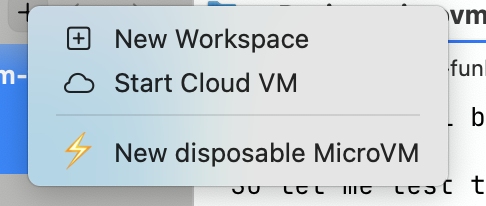
cmux reload-config and it should reload. Right-click the + in the titlebar and your action appears with a hotkey, in a brand new workspace that shows up in the left sidebar. There are 2 ways we can do this via that script.
One is to just launch a new cmux workspace and auto-run a command that ssh’s into the VM. This is the workspaceCommand action above — the workspace’s terminal surface runs:
ID=$(/path/to/launch-microvm.sh) && exec ssh "root@${ID}.microvm"The other is to use native cmux ssh, which spins up the workspace itself (and gets you the sidebar extras — listening ports, file tree, drag-and-drop scp). Here the action is a plain command that runs:
ID=$(/path/to/launch-microvm.sh) && exec cmux ssh --ssh-option ConnectTimeout=60 "root@${ID}.microvm"(The --ssh-option ConnectTimeout=60 matters: cmux ssh sets its own short ConnectTimeout=6, which would kill microvmssh’s handshake mid-dance.)
The issue is that the command to run cmux ssh is itself a terminal command, so it results in a temporary tab that closes once we run the command. Maybe there is a neater way to do this and I’ll document if I find it. I also set the autoResume to true. I haven’t played around enough with manually suspending and resuming but you could also change that.
Both wirings live in the repo — cmux.json (plain ssh) and cmux-ssh.json (native cmux ssh).
One gotcha:
microvmssh runs as the ProxyCommand, so it needs AWS credentials in its own environment- regular AWS creds are all it needs: either the env vars (AWS_ACCESS_KEY_ID / AWS_SECRET_ACCESS_KEY / optional AWS_SESSION_TOKEN) or a profile in ~/.aws/credentials, plus AWS_REGION. If your interactive shell already exports these, plain ssh works as-is. If it doesn’t (or you want the config to be self-contained), pin them onto the ProxyCommand line so any ssh invocation picks them up regardless of the calling shell. This one caught me because I use granted via credential_process, so I thought I’d mention it.
The button
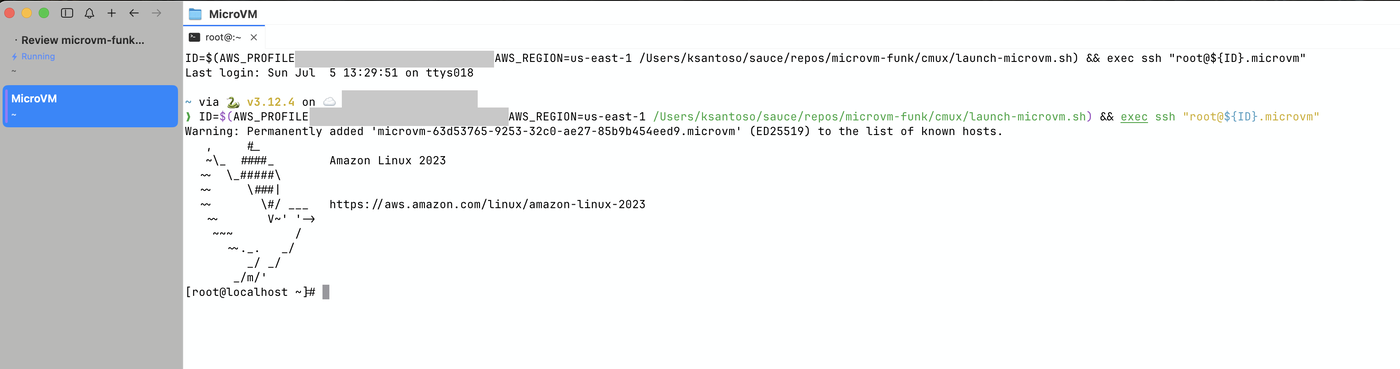
Right-click cmux’s titlebar + → ⚡ New disposable MicroVM. ~30 seconds later — a few seconds to launch the VM, then microvmssh’s WebSocket-to-PTY dance — you’re at a root prompt in a fresh AL2023 box with git, node, Python, AWS CLI, Claude Code, vim, jq, all the usual.
A new workspace shows up in the sidebar, the launcher runs, and it SSHes straight in:
The launcher script the action invokes:
set -euo pipefail
: "${AWS_REGION:=us-east-1}"
: "${STACK_NAME:=microvm-shell}"

stack_output() {
  aws cloudformation describe-stacks --region "$AWS_REGION" --stack-name "$STACK_NAME" \
    --query "Stacks[0].Outputs[?OutputKey=='$1'].OutputValue" --output text
}

ID=$(aws lambda-microvms run-microvm \
  --region "$AWS_REGION" \
  --image-identifier "$(stack_output ImageArn)" \
  --execution-role-arn "$(stack_output ExecRoleArn)" \
  --ingress-network-connectors "arn:aws:lambda:${AWS_REGION}:aws:network-connector:aws-network-connector:SHELL_INGRESS" \
  --idle-policy '{"maxIdleDurationSeconds":600,"suspendedDurationSeconds":120,"autoResumeEnabled":true}' \
  --maximum-duration-in-seconds 28800 \
  --query microvmId --output text)

# wait for RUNNING, then:
exec ssh "root@${ID}.microvm"
Loading credentials with scp
Obviously a fresh VM is not super effective without any tools. Because it is just ssh we can simply scp any creds we need to. The beauty is these vms suspend and terminate and are ephemeral so we can just throw them away and use short lived tokens.
GitHub (export-macos-gh-creds.sh)
# Pull token from local gh CLI (which reads it from macOS Keychain)
GH_TOKEN=$(gh auth token)

# Write to ~/.git-credentials and tell git to use credential.helper=store
ssh "$HOST" "umask 077 && cat > /root/.git-credentials && \
             git config --global credential.helper store" \
  <<< "https://x-access-token:${GH_TOKEN}@github.com"

# Copy your local gitconfig too — user.name, user.email, aliases
scp -q ~/.gitconfig "${HOST}:/root/.gitconfig"
Claude Code (export-macos-claude-creds.sh)
This one took me a few tries to get right and it may not work forever but Claude Code stores its OAuth blob in macOS Keychain under "Claude Code-credentials". scp’ing that blob alone to /root/.claude/.credentials.json is almost enough (claude -p works fine). But interactive claude still demanded a browser auth flow.
I found the answer on Reddit but there’s a separate file ~/.claude.json (in the home dir, not the .claude/ directory) that gates the first-run onboarding wizard. Without {"hasCompletedOnboarding": true} in that file, the TUI launches the welcome wizard and asks you to login via auth which you could do by pasting the URL, but that would be a pain every time.
# Full keychain blob (has claudeAiOauth + mcpOAuth for MCP servers)
CREDS=$(security find-generic-password -s "Claude Code-credentials" -w)
ssh "$HOST" "mkdir -p /root/.claude && umask 077 && cat > /root/.claude/.credentials.json" <<< "$CREDS"

# Skip the welcome wizard — without this, interactive claude wants browser auth
ssh "$HOST" "echo '{\"hasCompletedOnboarding\": true}' > /root/.claude.json"
Now both claude -p AND claude (interactive TUI) work, using the OAuth grant from your local Keychain. The credential only ever lives on the disposable VM; your Keychain remains the source of truth.
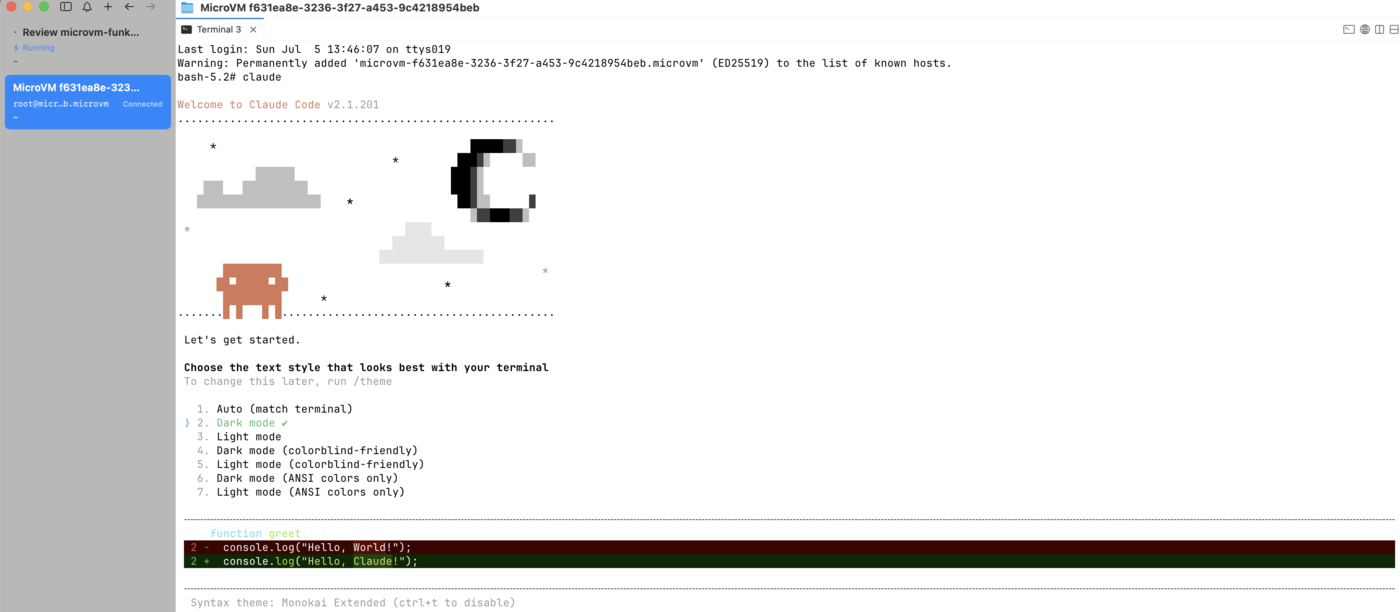
(There’s also a claude setup-token + CLAUDE_CODE_OAUTH_TOKEN env-var path — works for headless claude -p only, not interactive. Documented in case you prefer that, but the credentials.json + onboarding flag combo is simpler and covers both modes.)
The pattern, for anything else
# AWS creds — resolve via your local cred resolver, write to ~/.aws/credentials
ssh "$HOST" "mkdir -p /root/.aws && umask 077 && cat > /root/.aws/credentials" <<EOF
[default]
aws_access_key_id     = $AWS_ACCESS_KEY_ID
aws_secret_access_key = $AWS_SECRET_ACCESS_KEY
aws_session_token     = $AWS_SESSION_TOKEN
EOF

# SSH keys for hopping further
scp -q ~/.ssh/id_ed25519 "${HOST}:/root/.ssh/id_ed25519"
ssh "$HOST" "chmod 600 /root/.ssh/id_ed25519"
credentials never persist anywhere they don’t have to. Your laptop’s Keychain stays the source of truth. The VM gets short-lived copies on a disposable filesystem that expire alongside the VM. The transport is TLS via the AWS shell-ingress connector, IAM-authed end-to-end.
That’s pretty much it. You can use the native cmux drag and drop to drop in a suspect file to audit with short lived creds as well as the native cmux browser integration. It’s still a bit slow for me(us-east-1 is pretty far), but for any long running or need for isolation I’ll be spinning these up.
What’s next
I’d love to get this working with resumable sessions as well as hand off sessions to subagents on microvms. I don’t think there is a mechanism yet to resume via a session id like bedrock agentcore, so it might be worth keeping a small dict that just keeps session id to microvm id so it’s easy to suspend/resume. Still a lot of exploring either way but it’s a pretty cool product.